
Occurrence Logs
Digital Occurrence Book for South Africa
A comprehensive incident logging system with rich media capture, GPS tracking, and follow-up workflows. Report incidents quickly from mobile devices with detailed descriptions, multiple photos, video clips, and audio notes. Every incident is automatically tagged with GPS coordinates, timestamp, and shift information. Track incidents from report through investigation, resolution, and closure with complete documentation of corrective and preventive actions.
- Quick incident capture from mobile home screen
- Unlimited photo attachments with GPS tagging
- 10-second video clips with audio evidence
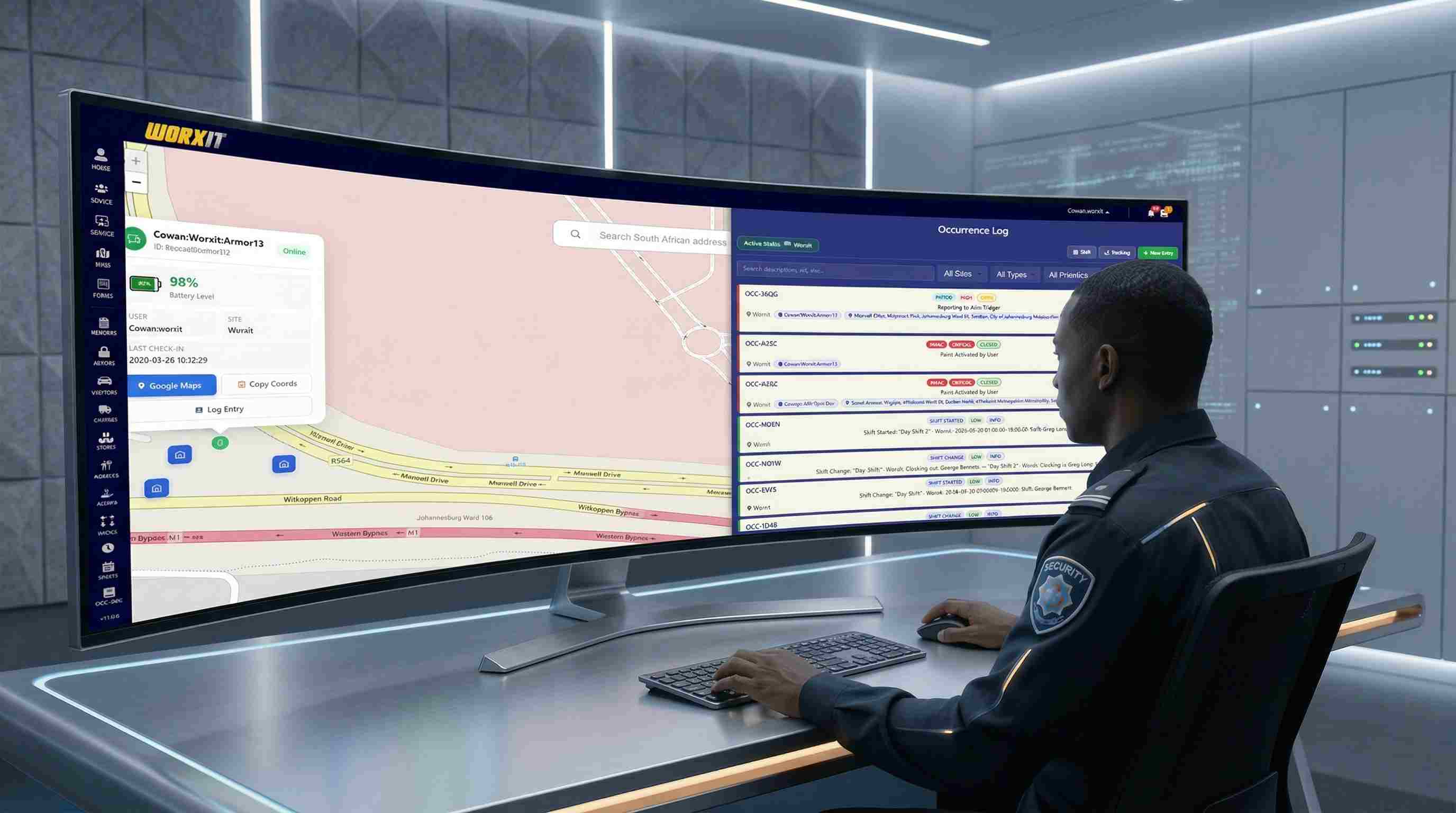

Occurrence Logs highlights
- Quick incident capture from mobile home screen
- Unlimited photo attachments with GPS tagging
- 10-second video clips with audio evidence
- Automatic GPS coordinates and address geocoding
- Severity levels from low to critical
- Shift integration and handover notes
- Follow-up workflows with status tracking
- Analytics dashboard with trend visualization
What is a digital occurrence book, and how does Worxit run one?
A digital occurrence book (OB) replaces the paper register kept at a security post with entries logged on a phone. In Worxit's Occurrence Logs module, an officer captures an incident from the mobile home screen with its type, a severity from low to critical, a description, unlimited photos, 10-second video clips and audio notes. Each entry is tagged automatically with GPS coordinates, the address, the time and the active shift, and supervisors see entries as they are made. Every incident then moves through a follow-up workflow, from open to resolved and closed, with corrective actions recorded. Managers export incidents to Excel or PDF and view trends on the dashboard. The app keeps capturing without signal and syncs once back in coverage. Licences follow standard Worxit pricing: the dashboard is R600 per month, including one admin user, and each phone, tablet or radio running the app needs a R350 monthly device licence, all ex VAT.
Before and after
What problems does a digital occurrence book solve?
Document incidents and events with comprehensive media capture and GPS tracking. Designed for incident management and operational compliance.
Without Zamatrack
- Incidents reported manually or not at all
- Missing photos and location data
- No follow-up tracking
- Difficult to analyze incident trends
With Zamatrack
- Quick mobile incident reporting
- Complete evidence with GPS and timestamps
- Structured follow-up and resolution
- Trend analysis and reporting
How it works
How does a digital occurrence book work?
Simple, repeatable steps, built for teams moving fast across sites.
Capture Incident
Quick incident capture with type, severity, description, photos, video, and GPS.
Document Evidence
Add detailed descriptions, witness statements, signatures, and audio notes.
Assign & Track
Route to responsible parties and track status through resolution stages.
Resolve & Close
Document resolution, corrective actions, and preventive measures with full audit trail.
Core features
What features does a digital occurrence book include?
Not a full feature dump, just the capabilities that make the solution powerful.
Incident Categorization
Categorize incidents by type (security, safety, maintenance, HR) and severity level.
Photo & Video Capture
Unlimited photos and 10-second video clips, all timestamped and GPS-tagged.
GPS & Location
Automatic GPS capture, address geocoding, location maps, and geofence validation.
Shift Integration
Link incidents to active shifts with handover notes and incident count tracking.
Digital Signatures
Capture witness statements and approvals with digital signatures.
Follow-up Workflow
Track incidents from open → in-progress → resolved → closed with assignment.
Resolution Documentation
Document resolution notes, corrective actions, and preventive measures.
Analytics & Reporting
Filter, export to Excel/PDF, email distribution, and trend visualization.
Compared
How does a digital OB compare with a paper OB?
A paper OB works when it is kept well, but it has limits.
| Feature | Paper OB | Worxit Occurrence Logs |
|---|---|---|
| When an entry is timestamped | Paper OBWritten by hand, so a late entry looks the same as one written at the time | Worxit Occurrence LogsTimestamped automatically when the entry is made |
| Who can read it | Paper OBOnly people at the post | Worxit Occurrence LogsSupervisors off site, as entries are made |
| Evidence | Paper OBText only: you cannot attach a photo of the broken lock | Worxit Occurrence LogsUnlimited photos, 10-second videos, audio notes and signatures |
| Location | Paper OBWhatever the officer writes | Worxit Occurrence LogsGPS coordinates and address added automatically |
| Follow-up | Paper OBNot tracked in the book | Worxit Occurrence LogsOpen, in progress, resolved and closed, with corrective actions |
| Trends and reports | Paper OBHard to analyse | Worxit Occurrence LogsFilters, Excel and PDF exports, and trend charts |
Product tour
What does a digital occurrence book look like in Worxit?
See how the workflow maps to real operations: capture, verification and reporting.
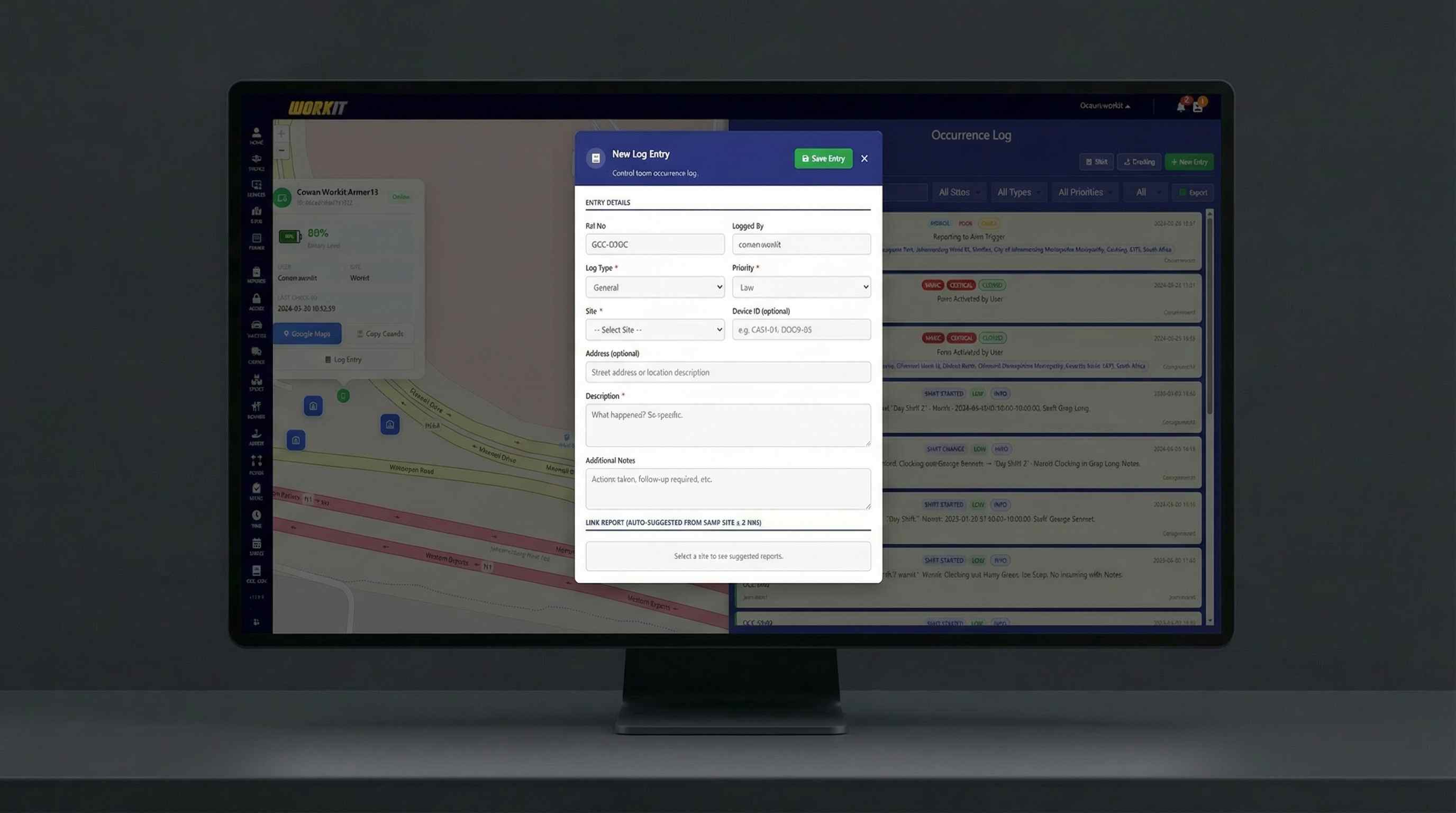
Operations dashboard
Centralised visibility with audit-ready records and fast filtering by site.
- Quick incident capture from mobile home screen
- Unlimited photo attachments with GPS tagging
- 10-second video clips with audio evidence
Use cases
Who is a digital occurrence book for?
Common teams and environments where this solution delivers immediate impact.
Security incident reporting and investigation
Safety observations and near-miss tracking
Maintenance issues and equipment failures
HR incidents and workplace conflicts
Compliance documentation and audits
Quality control and defect reporting
See Occurrence Logs working on your sites
A 30-minute live demo, tailored to your operation. No obligation.
Measurable outcomes
What results can you expect from a digital occurrence book?
Results-focused impact: clear improvements your team can feel quickly.
Faster incident reporting and response
Complete evidence capture with GPS proof
Improved resolution and closure times
Better trend analysis and prevention
Works with
- Mobile devices
- GPS
- Shifts
- Excel exports
- PDF reports
Hardware and licences
What hardware and licences do you need?
Hardware and licences designed for this solution, available in our online store.


Guides
Which guides go deeper on this?
In-depth operational frameworks, compliance guides, and technology comparisons.
What Is an OB Book? How to Write Occurrence Book Entries
What every OB entry must include, with worked examples for patrols, incidents, alarms and shift handovers.
Read guideDigital vs Paper Occurrence Books: Modernising Security Logs
Why leading South African security providers are replacing paper OB books with tamper-proof, GPS-verified digital incident logs.
Read guidePSIRA Compliance Checklist for South African Security Companies
Record-keeping steps for PSIRA inspections, and how digital occurrence logs give incidents verifiable timestamps.
Read guideGuard Patrol Systems Compared: Offline Wands, Live GSM Devices and Smart Platforms
Evaluate how modern platforms unify digital occurrence logs with live guard patrols versus legacy offline wands.
Read guideFAQ
What do buyers ask about a digital occurrence book?
Common questions from teams evaluating occurrence logs.
What is a digital occurrence book?
A digital occurrence book replaces the paper OB register used by security teams, letting guards log incidents from mobile devices with photos, video, GPS location, and timestamps.
Is a digital occurrence book accepted for security reporting in South Africa?
Digital occurrence logs capture the same information as a traditional OB — time, date, description, and signatures — while adding verifiable GPS and media evidence, making entries harder to dispute during investigations or audits.
Can incidents be tracked from report to resolution?
Yes, each incident moves through a follow-up workflow (open, in-progress, resolved, closed) with resolution notes and corrective actions documented.
What evidence can be attached to an occurrence log entry?
Unlimited photos, short video clips, audio notes, and digital signatures can be attached, all automatically GPS-tagged and timestamped.
Sources
- Private Security Industry Regulation Act 56 of 2001. gov.za. The Act that regulates security service providers in South Africa.
- Private Security Industry Regulatory Authority (PSIRA). The regulator that registers and inspects security businesses and officers.
One platform
Which modules work well alongside it?
Every module shares the same dashboard, users and reports, so you can add more as you grow.
Guard Patrol Solutions
Digitise, track, and verify security patrols in real time across all sites.
Learn moreTwo-Way Radios with Patrols
Unify voice communications and verified patrol workflows—managed centrally from the cloud.
Learn moreShifts
Complete control and visibility over workforce scheduling and operational handovers.
Learn moreReady to see Occurrence Logs in action?
Book a 30-minute live demo and see how Worxit fits your sites, teams and reporting.