
Rosters
Guard Roster Software for South African Shift Operations
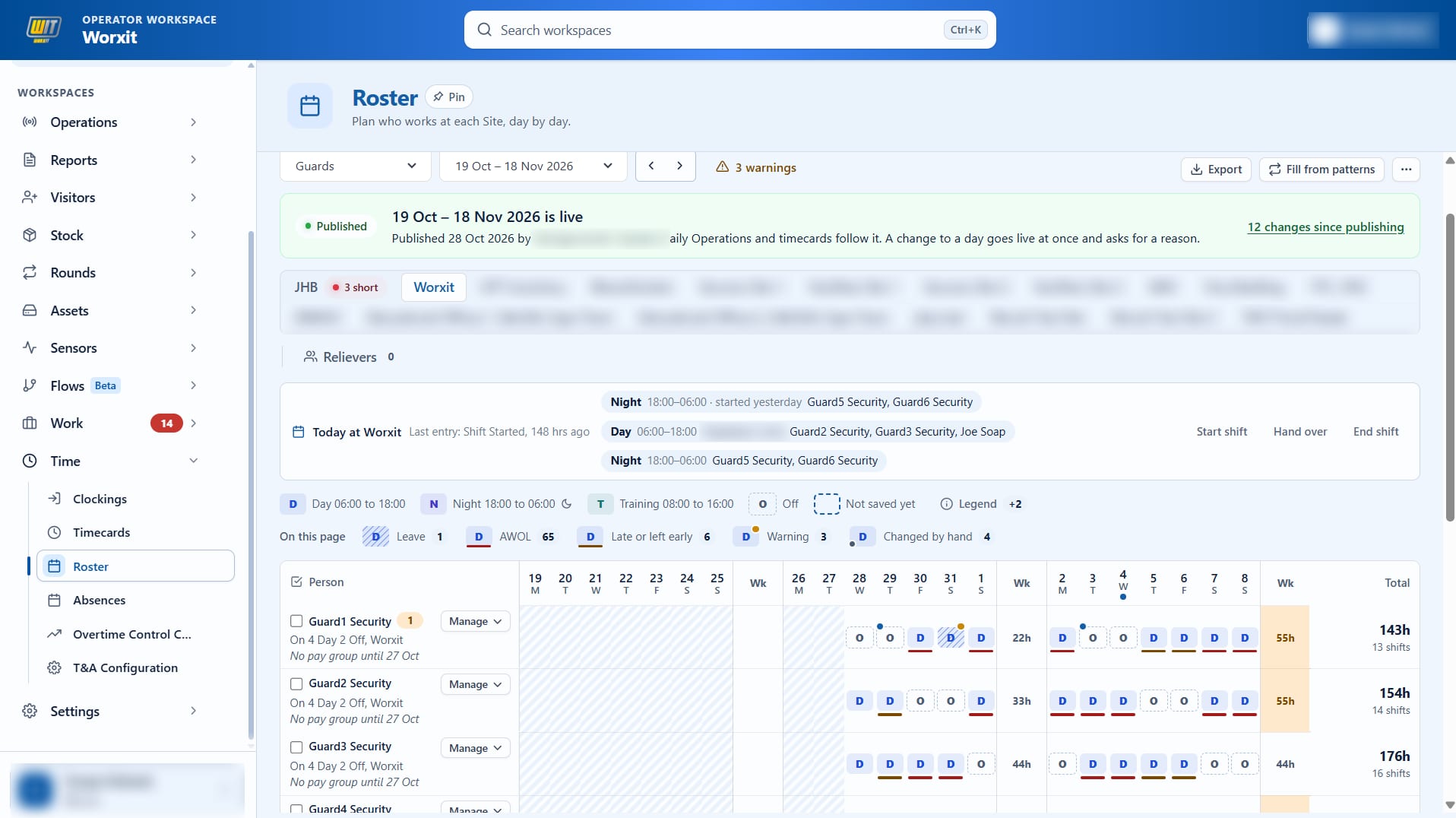
Worxit Rosters is the plan of who works when and where: one entry per person per day, one site at a time. Set your shift types and the cover each site needs, build repeating patterns such as 2 Day 2 Night 2 Off, and fill the period in one step. Cover rows show where a site is short or over, relievers come up first to fill a gap, and working-time warnings flag rest, weekly hours, shift length and meal breaks while you plan. Once published, the roster is what Time & Attendance checks clockings against, so late arrivals, no-shows, AWOL and missing clock-outs are measured against the plan.
- Cover targets per site
- Repeating patterns and Fill
- Relievers for short sites

Rosters highlights
- Cover targets per site
- Repeating patterns and Fill
- Relievers for short sites
- Working-time warnings
- Publish with an audit trail
- Client and office exports
- Linked to Time & Attendance
What is roster software, and how does Worxit Rosters work?
Roster software plans who works when and where, and checks that plan against what each site needs. In Worxit Rosters, managers set shift types and the cover each site needs on each weekday, then plan by typing shift codes onto a grid or filling the period from repeating patterns such as 2 Day 2 Night 2 Off. Cover rows show where a site is short or over, and relievers come up first when a gap needs filling. Working-time warnings flag rest between shifts, weekly hours, shift length and meal breaks against each person's time rules, without blocking the plan. Publishing makes the roster the plan that Time & Attendance reads, so late arrivals, no-shows, AWOL and missing clock-outs are measured against it. Every change after publishing needs a reason and is logged. Licences follow standard Worxit pricing: the dashboard is R600 per month, including one admin user, and each phone, tablet or radio running the app needs a R350 monthly device licence, all ex VAT.
Before and after
What problems does roster software solve?
Plan who works at each site, day by day, then follow the plan into Time & Attendance. Built for 24/7 guarding, cleaning and facilities rosters across many sites.
Without Zamatrack
- Rosters kept in spreadsheets that nobody else can read
- Gaps in cover found when the client phones
- Shift swaps agreed off the roster
- Rest periods and weekly hours breached without anyone noticing
- Payroll worked out from the plan, not from what was worked
With Zamatrack
- See which sites are short or over before the shift starts
- Fill gaps from relievers who are free that day
- Catch working-time problems while the roster is being built
- Every change after publishing carries a reason, who and when
- Attendance exceptions measured against the published plan
How it works
How does roster software work?
Simple, repeatable steps, built for teams moving fast across sites.
Set up shift types and cover
Define shift types with their times and meal break, give each site its own times if needed, and set how many of each shift the site needs on each weekday.
Plan with patterns
Type codes straight onto the grid, or build a repeating pattern of 1 to 56 days, give it to people from a start date and fill the period. Only empty days are filled.
Check cover and warnings
Cover rows show short, over or met for each day. Working-time warnings flag rest, weekly hours, shift length and meal breaks against each person's time rules.
Publish and follow the day
Publish the period for every site at once. Time & Attendance then checks clockings against it and raises late, no-show, AWOL and missing clock-out exceptions.
Core features
What features does roster software include?
Not a full feature dump, just the capabilities that make the solution powerful.
Roster grid
A person per row and a day per column, with weekly and period hour totals. Type a shift code, O for Off, or open a day to change its times, site or note.
Cover and gaps
Set the cover each site needs per shift type and weekday. Click a short day to see relievers for that site first, then other relievers, then everyone available.
Patterns and Fill
Presets such as 2 Day 2 Night 2 Off and 4 on 4 off, staggered per person so two guards on the same cycle do not share the same nights.
Working-time warnings
Rest between shifts, weekly rest, week hours, shift length and meal breaks, checked against each person's Time Rule Profile. Warnings advise and never block.
Changes since publishing
Edits to a published day need a reason such as Sick, Leave, Swap or Client request, and are listed with the old and new value, who and when.
Client and office exports
A client copy PDF per site with a sign-off line and no hours, and an office copy in Excel with real codes, hours and day totals for every site.
Compared
How does Worxit Rosters compare with a spreadsheet roster?
| Feature | Spreadsheet roster | Worxit Rosters |
|---|---|---|
| Cover | Spreadsheet rosterChecked by eye, if at all | Worxit RostersShort, over or met per site and day |
| Hours and rest | Spreadsheet rosterFound when someone checks | Worxit RostersWarnings while the roster is built |
| Changes | Spreadsheet rosterSwaps agreed on WhatsApp | Worxit RostersEach change logged with a reason, who and when |
| Attendance | Spreadsheet rosterReconciled at month-end | Worxit RostersClockings checked against the published plan |
| Client copy | Spreadsheet rosterEdited by hand | Worxit RostersPDF per site with a sign-off line |
Use cases
Who is roster software for?
Common teams and environments where this solution delivers immediate impact.
Security guard rosters
Cleaning and hygiene teams
Facilities and estate staff
Multi-site contract operations
24/7 control rooms
Relief and standby planning
See Rosters working on your sites
A 30-minute live demo, tailored to your operation. No obligation.
Measurable outcomes
What results can you expect from roster software?
Results-focused impact: clear improvements your team can feel quickly.
Short and over-staffed days visible per site
Working-time warnings before a roster is published
A reason and an author for every published change
Late, no-show and AWOL measured against the plan
Works with
- Time & Attendance
- Occurrence Logs
- Absences and leave
- SimplePay and PaySpace exports
- Excel and PDF
Hardware and licences
What hardware and licences do you need?
Hardware and licences designed for this solution, available in our online store.




Guides
Which guides go deeper on this?
In-depth operational frameworks, compliance guides, and technology comparisons.
The Roster Said the Post Was Covered. The Site Said Otherwise.
Six places shift rosters quietly break on multi-site security and facilities operations, and what under control would look like.
Read guideWhat a Broken Roster Really Costs: A Line-by-Line Worked Example
Unplanned overtime, paid-but-not-worked hours, reconciliation and client penalties for an illustrative 80-person shift operation.
Read guideChoosing a Rostering and Time-and-Attendance Solution: A Buyer's Guide
Five routes to market, twelve evaluation criteria, the questions to ask every vendor and the red flags to watch for.
Read guideThe First 90 Days of Connected Rostering: What Worked, What Went Wrong
A composite case study of moving rostering and attendance onto one platform, month by month, including the mistakes.
Read guideFAQ
What do buyers ask about roster software?
Common questions from teams evaluating rosters.
What is the difference between Rosters and Time & Attendance?
Rosters is the plan: who should work at which site, on which shift. Time & Attendance records what happened: who clocked in, when and where. Once a roster is published, Time & Attendance checks every clocking against it and raises exceptions such as late arrival, no-show, AWOL and missing clock-out.
Does Rosters stop me publishing a roster that breaks working-time rules?
No. Working-time warnings advise and never block. They check rest between shifts, weekly rest, week hours, shift length and meal breaks against each person's Time Rule Profile, and clear themselves when the plan changes. Your rules come from your own profiles, so agree them with HR or your payroll adviser.
Can I use repeating shift patterns?
Yes. Build a cycle of 1 to 56 days, start from a preset such as 2 Day 2 Night 2 Off or 4 on 4 off, and give it to people from a start date. Fill from patterns writes the cycle into the period, and only empty days are filled, so nothing already planned is changed.
What happens when I change a roster after it is published?
The change goes live when you save it, and you choose a reason: Sick, Leave, Swap, Client request, Correction or Other. Every change is listed under Changes since publishing with the old and new value, who made it and when. A published period cannot be unpublished.
What can I send to a client?
The client copy is a PDF of the site roster with each guard's shift by day and a sign-off line. It shows no hours, and leave, sick and AWOL all print as Off to protect staff privacy. The office copy is an Excel file with the real codes, hours and day totals for every site.
One platform
Which modules work well alongside it?
Every module shares the same dashboard, users and reports, so you can add more as you grow.
Guard Patrol Solutions
Digitise, track, and verify security patrols in real time across all sites.
Learn moreOccurrence Logs
Document incidents and events with comprehensive media capture and GPS tracking.
Learn moreTwo-Way Radios with Patrols
Unify voice communications and verified patrol workflows—managed centrally from the cloud.
Learn moreReady to see Rosters in action?
Book a 30-minute live demo and see how Worxit fits your sites, teams and reporting.